 Pingtail
Close the books. Without the chasing.
The complete month-end workflow, for US$9 a client.
What Pingtail does
- Chases clients for missing documents and answers
- Suggests accounts and GST codes for every transaction
- Brings documents, bookkeeping and month-end into one workspace
How it stays yours
- No app or login for your clients
- Branded email and WhatsApp to your clients
- Files to Google Drive and Dropbox
- You approve before QuickBooks or Xero changes
- Every supported change has an Undo
- Reads and writes QuickBooks and Xero; you approve first
Start free See how a month closes
14 days free. One client. No credit card required.
The right files come back, without you chasing.
Five short recordings of one client's September request, from the moment you send it to the zip.
-
Step 1: Send the request once.
The client gets one link by email. The reminder dates are set the moment it goes.
Wrong document? Caught immediately.
-
Step 2: A statement for the wrong month.
August's statement lands on a September request. The client's page says so at once, and they replace it.
-
Step 3: A photo too dark to read.
The page says it is hard to read, and the client sends a clear copy.
The check never rejects a file. Only a person at your firm sends one back.
-
Step 4: Your side: 7 of 9 in.
What is in, what needs your decision, what is still to come, and when the next reminder goes.
-
Step 5: The month in one zip.
Download every file at once, each named with the client, the month and the item.
Next, you Accept what passed, decide on what was flagged and start the books. Reminders keep going for the rest.
Your clients' paperwork is everywhere except where you need it.
Bring client communication, documents and transaction coding into one workflow.
-
Problem 1: Scattered information
Statements in WhatsApp. Receipts in email. Answers lost in conversations.
What Pingtail does: Your channels, one workflow
Collect through your firm's WhatsApp and email. Organise files by client and month.
-
Problem 2: Last-minute chasing
Documents arrive just before BAS or VAT deadlines.
What Pingtail does: Automatic follow-ups
Reminders run by themselves from the day you ask. Files are checked as they arrive.
-
Problem 3: Uncategorised transactions
Your team spends hours working out how to code each line.
What Pingtail does: AI does the legwork
A suggested account and tax code where Pingtail can place the line, with the reason. You approve before anything reaches QuickBooks or Xero.
One workflow. Your firm stays in control.
One workspace
End-to-end client communication
Month-end signed off, every client
How it works
How a month closes in Pingtail
From the first client request to month-end sign-off, one connected workflow.
-
Step 1: Connect the books.
Add a client with a name and an email, connect their QuickBooks or Xero. Pingtail reads the month and finds what is missing.
-
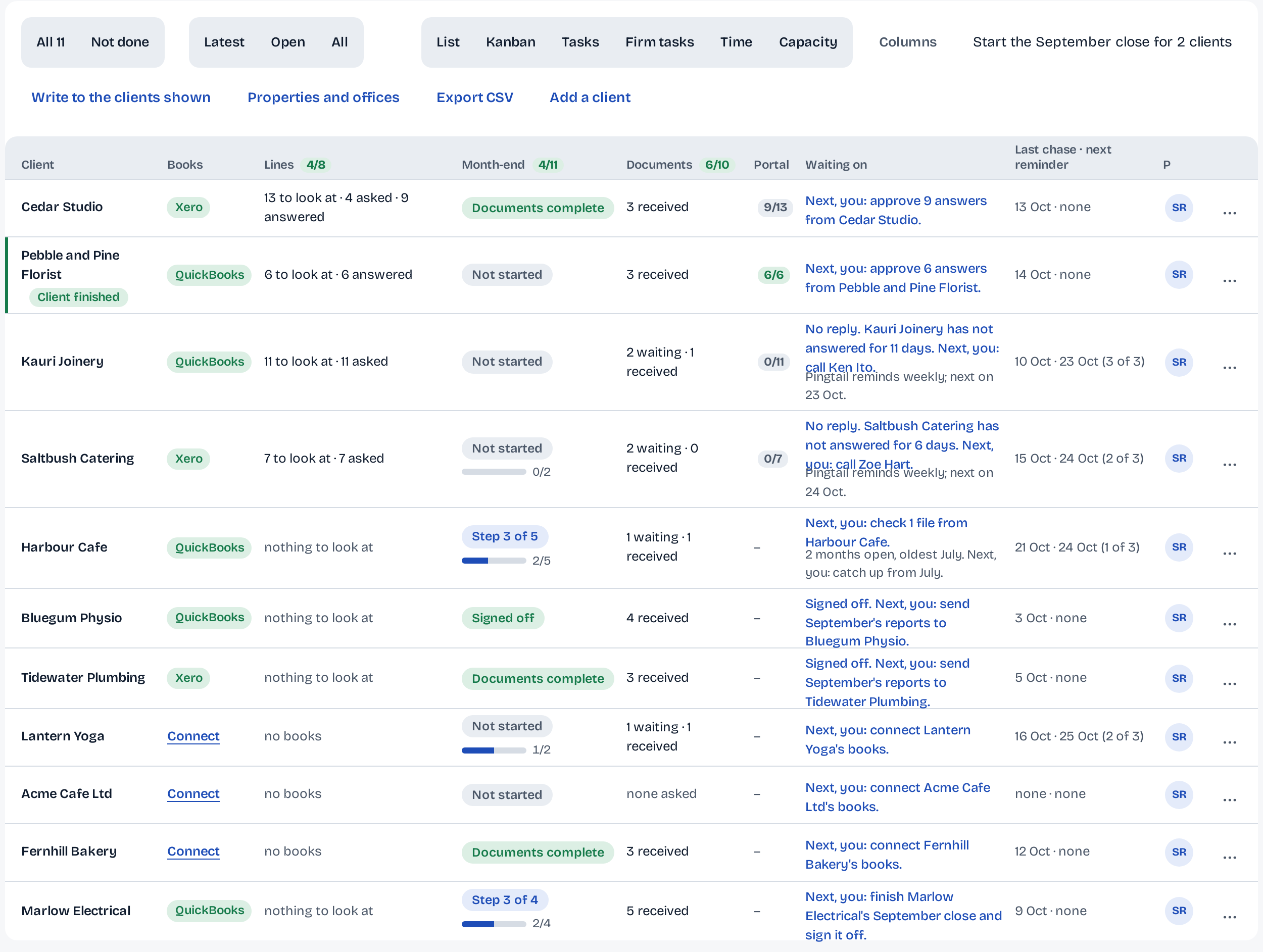
Step 2: Send one request.
Pick the clients on the board and press Send. Each client gets one link in your firm's name, by email or WhatsApp, listing the documents and the bank lines that need explaining.
-
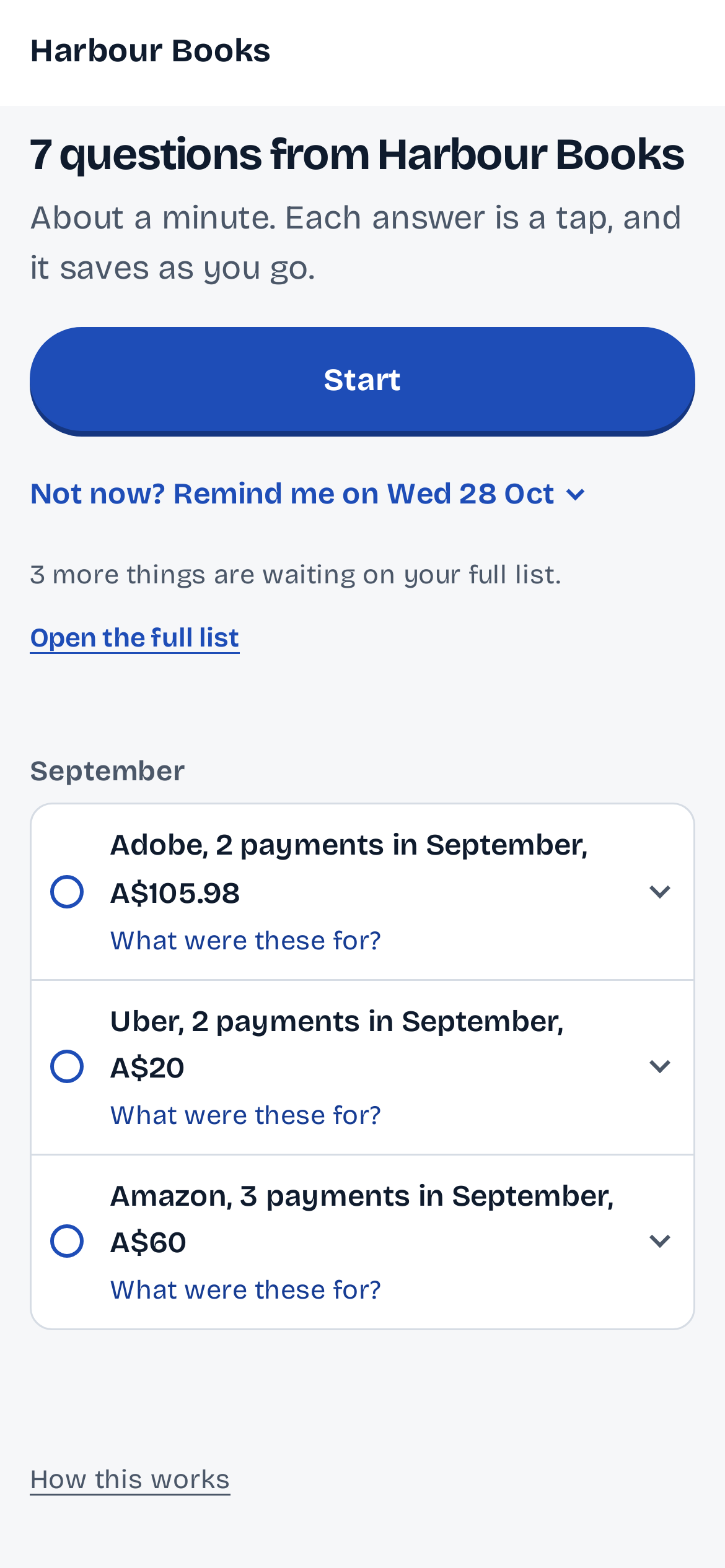
Step 3: The client answers from their phone.
No app, no login. They upload the receipt, type the answer or say "not sure". Files land in Google Drive or Dropbox, filed by client and month.
-
Step 4: Smart follow-ups, no chasing.
Pingtail reminds the client at the right times, in their daytime, and stops the moment it is done. You never write a chaser again, and the board shows who acts next.
-
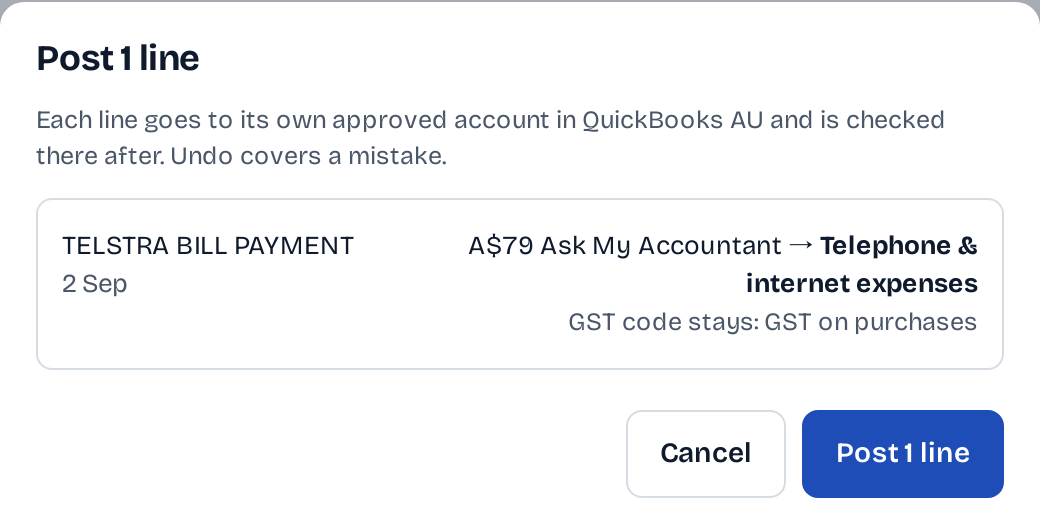
Step 5: Approve the lines.
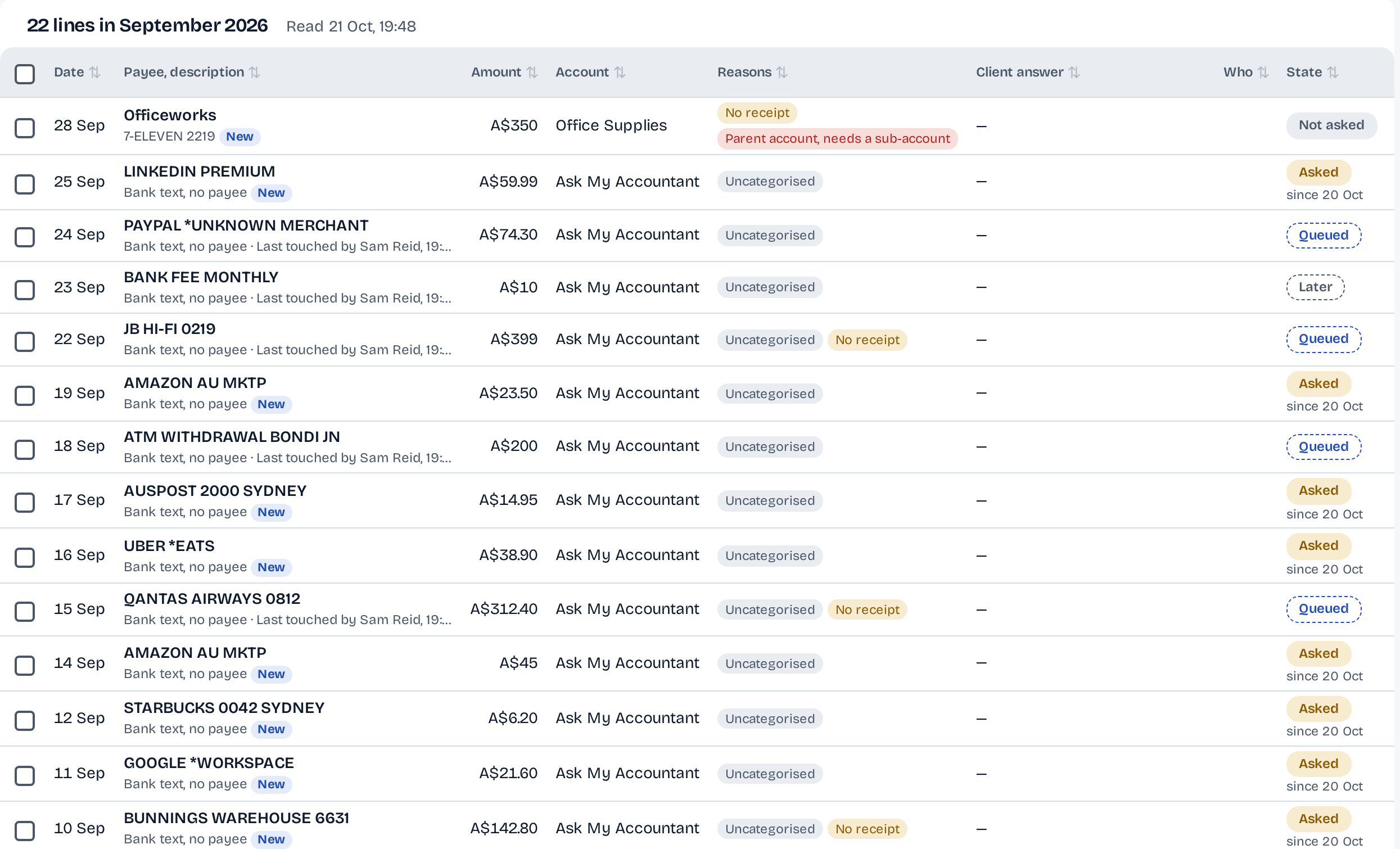
Each line shows the suggested account and tax code, the reason, and the client's answer. Approve one or the whole group. Nothing reaches QuickBooks or Xero before you press, and every supported change has an Undo.
-
Step 6: Sign off the month.
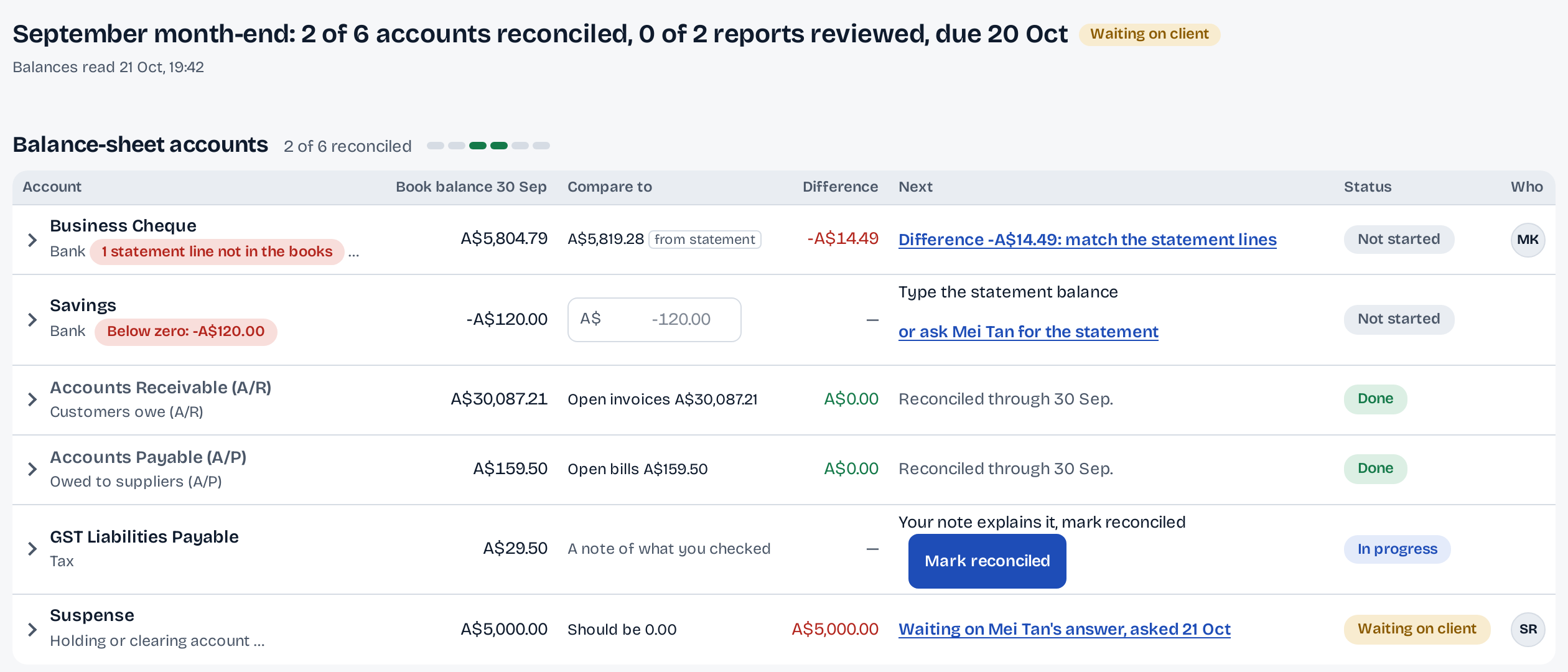
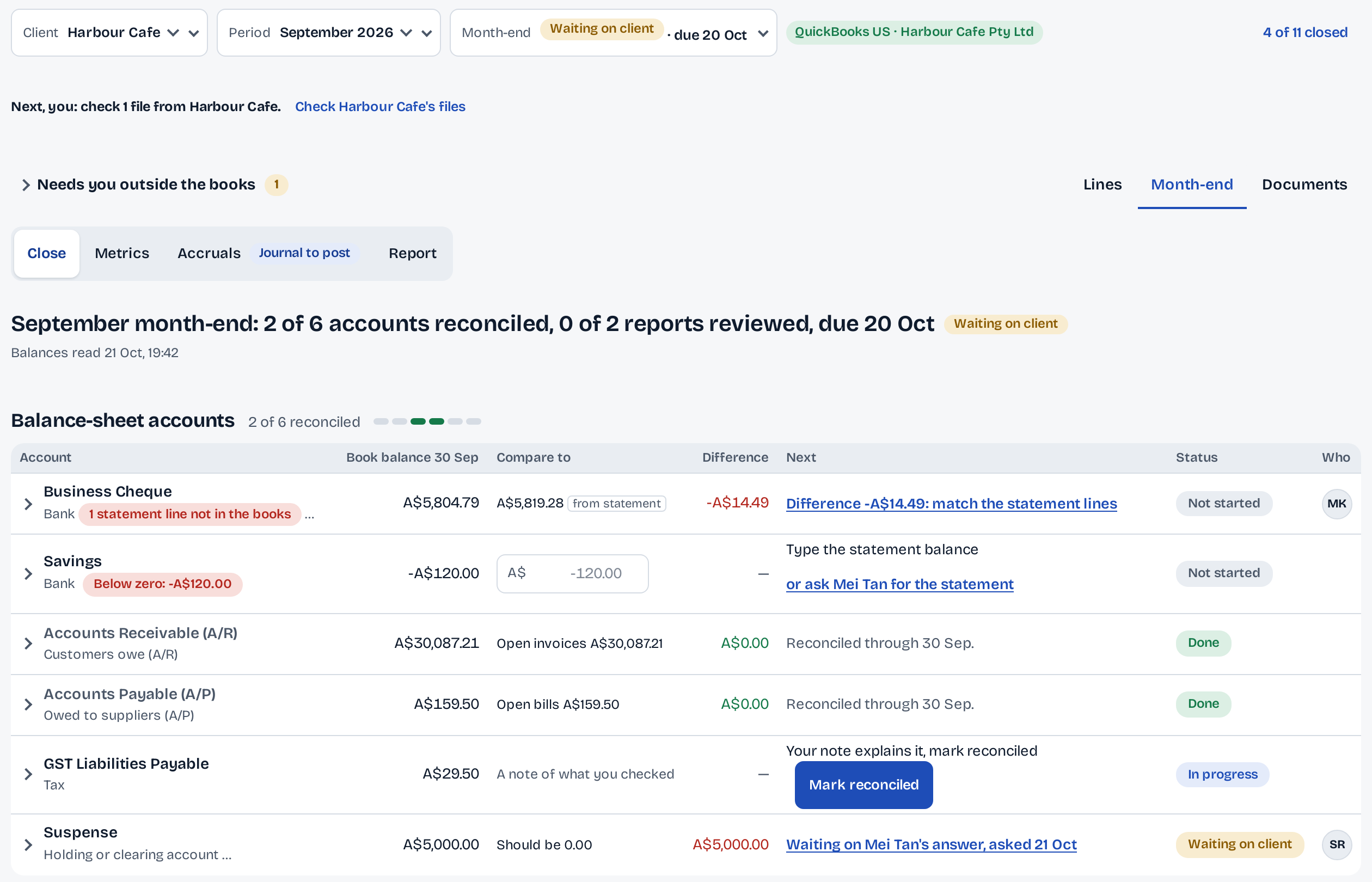
Month-end rows tie each account to its statement. Sign off, publish the report, and the next month is ready on the board.
Start free 14 days free. One client. No credit card required.
For the firm owner
See where your practice stands.
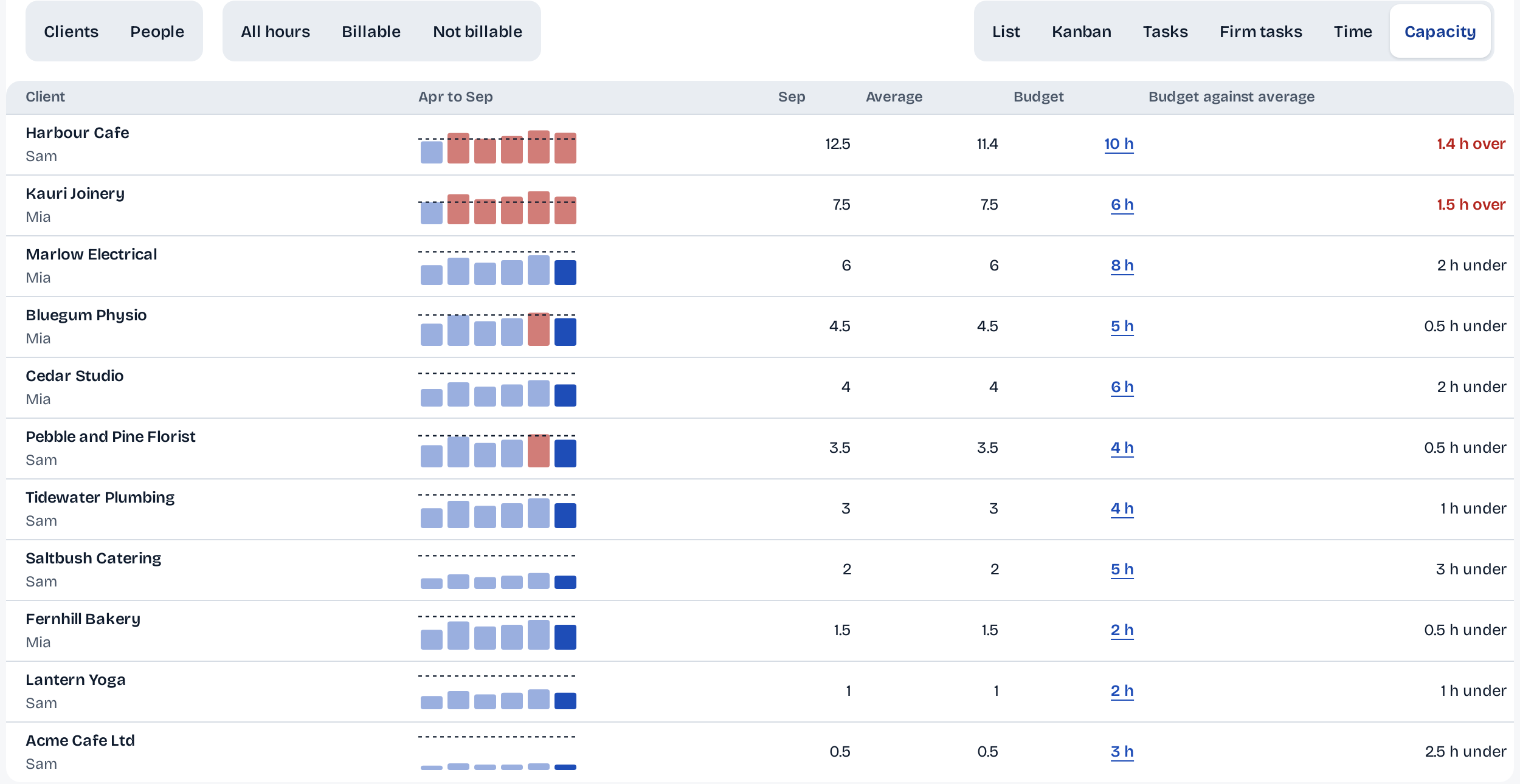
Hours against budget for every client, and each client's figures read from the books, not typed.
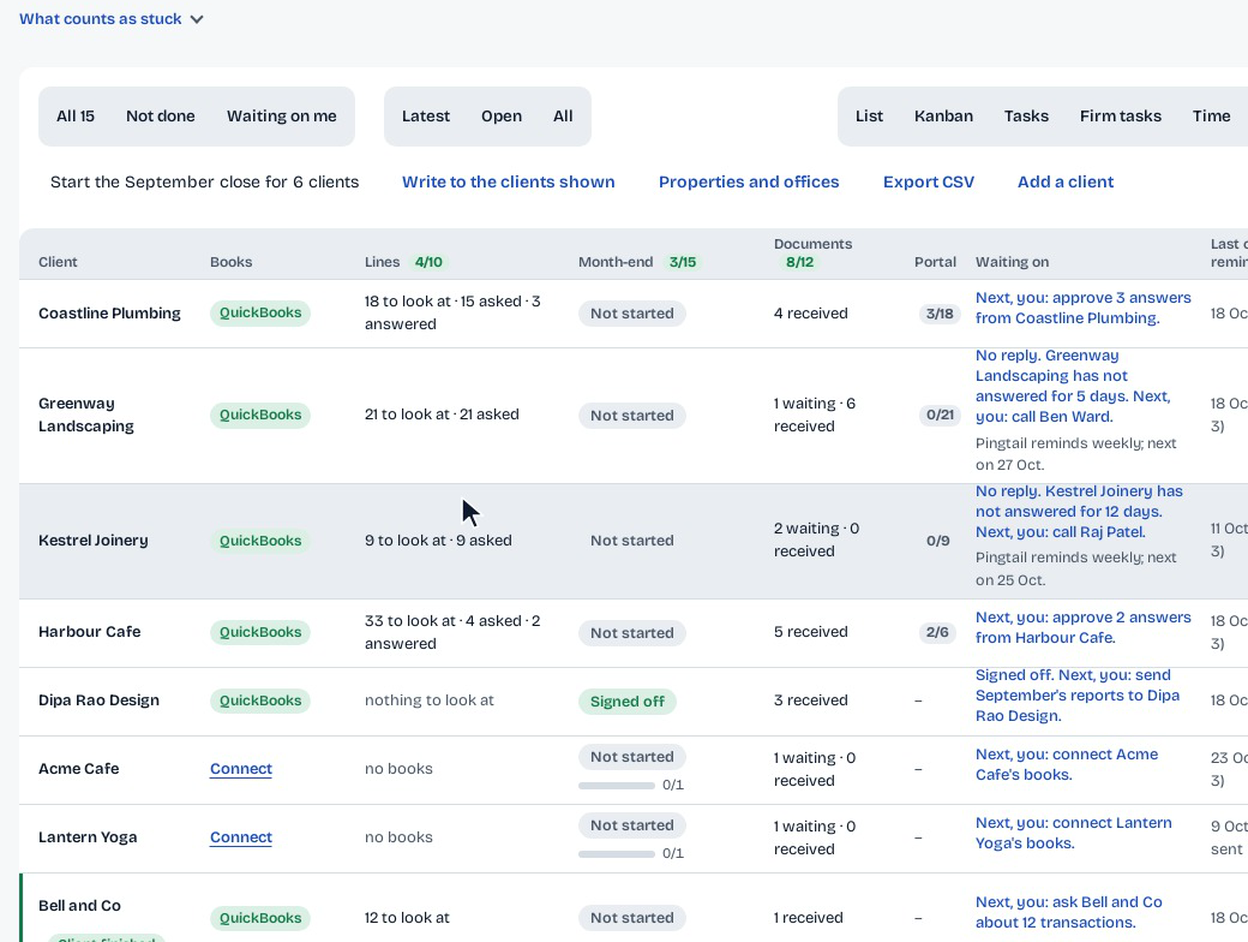
Stuck.
Asked days ago, opened and not answered, or waiting on you.
Costs you most.
Twice the firm's usual follow-ups or days to answer, and at least 3.
Workload.
Clients, lines assigned and reviews per person.

Hours against budget, per client.
Hours logged a month against a budget in hours; a client over its line shows red.
Who logged what.
By client, by person, billable or not. Hours are typed in, no timer.
Each client's month in figures.
Revenue, cash on hand and overdue from customers, read from QuickBooks and compared with last month.
Your workspace
Every client's month on one screen.
The board shows who acts next. Open a client and the whole month is there.
Month-end
Each balance-sheet account tied to its statement. Preparer and reviewer sign-off, then the report goes to the client in one press.
Lines
Each line with the suggested account and tax code, the reason, the client's answer. Approve one or the group; every supported change has an Undo.
Documents
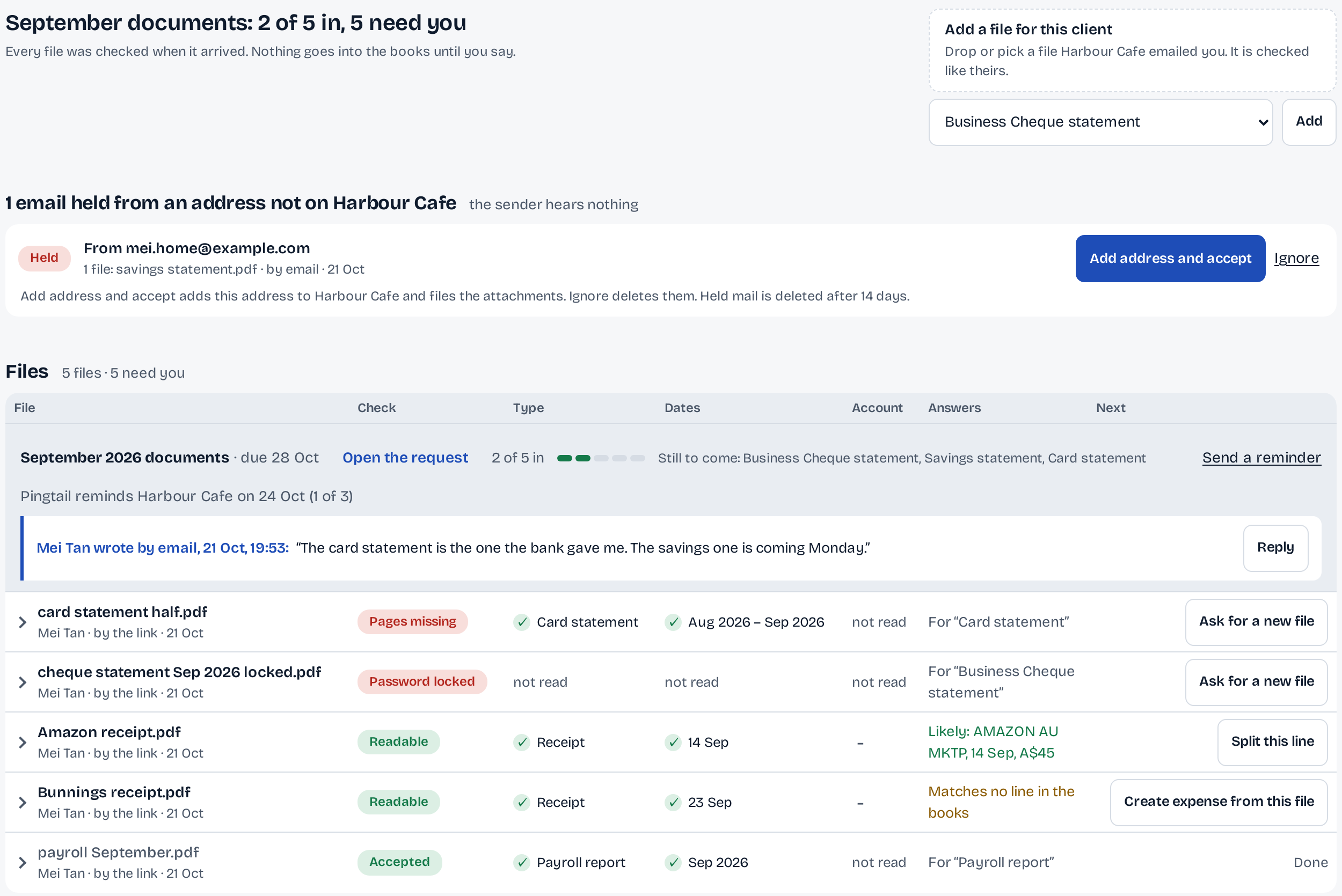
Everything the client sent, checked on arrival, filed by month. Drive and Dropbox stay in sync.
Every feature below. US$9 a client.
95 features, live today.
Close and tasks 28
- A close for every client
One close per client per month or quarter, with a period switcher.
- Next close starts by itself
Next month's close is ready the day the month ends.
- Back-fill earlier closes in one go
Tick the ended months of a year to create their closes.
- Close statuses you can rename
A due date and a status per close, in your own words.
- Close sections from accounts to sign-off
Accounts, review, accruals, final review and sign-off as sections.
- Task templates per client type
Each kind of client gets its own monthly or quarterly checklist.
- A starter library of templates
Copy a ready-made checklist into your own templates.
- Recurring tasks like payroll runs
Add one-time or recurring work such as 'run payroll every two weeks'.
- Subtasks and checklists with counts
Break a step into ticks and see how far it is (5 of 5).
- Owner and due date per task
Every task has who, when and a status; overdue shows red.
- Priority star on a task
Mark the step that must not slip.
- Tags on tasks and clients
Tag work and clients, then filter by tag.
- Link, history, move for tasks
Copy a link to one task, see its activity, move or delete it.
- Task notes with links
Leave instructions and links inside the step.
- Working papers that roll forward
Attach files to a task and carry them to the next close.
- Staff comments with @mentions
Talk on an item with @mentions; clients never see it.
- Preparer and reviewer sign-off
The preparer cannot sign their own work; an owner or admin can override.
- Preparer, reviewer, manager per client
Set who prepares, reviews and manages each client.
- Only admins change the steps
Lock the month-end steps so staff cannot edit or delete them.
- Only admins start new closes
Stop staff from opening a new month by mistake.
- Firm tasks beside client work
Track work that is not tied to any client.
- Done task tells the reviewer
Marking a step done asks the reviewer to look.
- Hours logged per client
Type the hours spent on each client and report on them.
- Closes marked on time or late
On time or late for each close, with the BAS readiness card.
- Offices within one firm
Split one practice into branches and keep them apart.
- Quick add for tasks and notes
Add a task, an upload, a note or an expense from one menu.
- Catch-up projects for clean-ups
Run a many-month clean-up as one project.
- Any fiscal year, monthly or quarterly
Close on the client's own year end and cadence.
Reconciliation 4
- A row per balance-sheet account
Every bank, card and balance-sheet account gets its reconcile row.
- Book balance against the statement
Reconciled through, balance at month end, compare to, the difference.
- Cleared lines inside the reconcile
Review each cleared line without leaving the close.
- Deletes that say what goes
A delete tells you exactly what it removes first.
Reports and accruals 3
- Monthly report pack for clients
Summary, metrics, profit and loss, balance sheet and more, as a PDF and live pages.
- Metrics built from the ledger
Cash, sales and other figures computed from the books each month.
- Footnotes that roll forward
Explain a number once and keep it month to month.
Review of the books 11
- Uncategorised lines, asked on the line
Every uncategorised line in one list, with a question one tap away.
- Your own saved checks
Write a check like 'over A$1,000 and no receipt' and keep it.
- Reviewed lines stay out next month
Open and reviewed tabs with counts; accepted lines do not come back.
- Split a payment across accounts
Split one payment across several accounts.
- Line detail with history and files
Similar history, line items and attachments beside each line.
- Duplicate a posted transaction
Repeat an entry from Pingtail; posted entries are never edited from here.
- General ledger, with CSV export
Read the ledger without opening QuickBooks, and download it.
- Bank lines missing from the books
See what the bank shows and the books lack.
- Changelog under each check
See who changed which line and when.
- Final review with month variances
Profit and loss and balance sheet by month, with the changes that matter.
- Lock a signed-off review
Stop changes to a month once it is signed off.
Bank lines and suggestions 6
- Bank lines: pending, posted, excluded
Work the bank lines in three states, in batches.
- Rules that post look-alike lines
Group lines by payee and account and approve them together.
- Bulk match, exclude or ask
Clear the bank lines in batches.
- Every suggestion shows its reason
History, your rules or the bank text: you see why before you approve.
- Draft an expense from a receipt
Turn a receipt into a draft you check and post.
- Suggestion usage you can see
A monthly allowance per firm, shown before it runs out.
Questions to the client 6
- Ask the client on any line
Send a plain question about a line from any check.
- Queue questions without emailing yet
Add many lines to the client questions, then send once.
- Free-text questions for clients
Ask about anything, not only bank lines.
- Questions to the right contact
Send payroll questions to the payroll person.
- The client's answer on the line
The answer appears on the line it is about.
- See when the client is finished
A highlight when the client has answered everything.
Client page and portal 6
- Your logo and colours
Your logo and colour on the client page and every email.
- Share files with the client
Files you mark visible appear on their page to download.
- Notes and links for clients
Permanent notes and links on the client page.
- One message on every client page
A line you write appears for all your clients.
- Preview a contact's page
See exactly what one contact sees.
- Published reports in the client's portal
Clients see the months you published and can ask about them.
Reminders and messages 5
- Reminders on your schedule
Automatic reminders on the days you choose, per client if needed.
- Message a client from the close
Write to a client without leaving the month.
- Schedule an email for later
Write now, send at a set time.
- Email many clients at once
One message to a whole list of clients.
- WhatsApp from your business number
Requests and reminders from your firm's WhatsApp business number.
Documents and files 8
- Ask for any document
Request statements, payroll, contracts and more.
- Book a receipt that matches nothing
Create the expense straight from the receipt.
- Two-pane review of each file
The document on the left, the form on the right.
- Every client's files in one place
One Files area per client, filed by month.
- Files delivered to Google Drive
Accepted files land in the client's Drive folder.
- Files delivered to Dropbox
Accepted files land in the client's Dropbox folder.
- Files attached in QuickBooks
An accepted file goes onto the QuickBooks transaction.
- Forward files to your capture tool
Send files on to Dext, Hubdoc or AutoEntry by email.
Clients and practice 10
- Every client's month on one screen
Done and total per section for every client, green when clear.
- Saved views, list or Kanban
Save a view with your columns, filters and sort.
- Custom fields on each client
Add the client properties your firm tracks.
- Client details and notes
Keep the facts and notes about each client in one place.
- Clients without books, included
Work with clients that have no ledger connected.
- Pause or archive a client
Pause a quiet client, or archive one that has left.
- Client chats in one inbox
Chat with each client from the Inbox in the top bar.
- Search every month at once
Find one payment across all months from the client header.
- Resource and report templates
Reuse notes, links and report layouts across clients.
- Switch client, keep your place
Change client or period and stay in the same section.
Team, security, settings 5
- Notifications and email settings per person
Each person chooses what reaches them by email.
- One settings page with a rail
Firm, logo, sections, portal, users and billing in one place.
- Rename and add close sections
Shape the month-end sections to how your firm works.
- Your legal line on every page
Your firm's disclaimer on the client page and the report email.
- Files encrypted, backed up nightly
Each file has its own key; the database is backed up every night.
Connections and billing 3
- QuickBooks connect and reconnect
Connect a client's QuickBooks Online in a few clicks.
- Priced per active client
One price per active client; no seats, no tiers.
- Pingtail Loop on WhatsApp
Our WhatsApp helper for quick questions.
Partner firms in Australia, the United Kingdom and the United States, quoted as they said it
From the firms we built this with.
Pricing
One price. Every feature. Every client.
The price is low because the software does the work, not because you get less. You stop paying for other vendors' overheads.
US$9 for each client, every 30 days.
You pay a client's first 30 days the day you add it. Then it renews on your one bill.
Every charge is final. Try it free for 14 days first. Refunds and your rights
Start free See the full price table
14 days free. One client. No credit card required.
No tiers, no seats, no setup fee.
Suggested coding is included.
Only active clients count.
Pause a quiet client; it is not on your next bill.
Xero on request in the trial.
And for every paid firm while there is room.
WhatsApp from your business number.
Included. Pingtail's own number comes in chase packs of 10, 25 or 100, valid 12 months.
Prices in US$, exclusive of GST and VAT. Your firm accounts for any tax due in your country.
What you get back
What a 25-client firm gets back in a year.
A 60-client firm: 396 hours back, about US$7,290 saved a year.
- US$3,037
- saved a year: 165 hours back at US$35 an hour, less US$2,738 for Pingtail.
- 165 hours
- a year back from chasing, at 6 minutes per chase.
- US$2,738
- a year for Pingtail at US$9 a client, every 30 days, every feature in.
Based on 25 clients, 3 items to chase a month, each chased 2 times at 6 minutes a chase (12 minutes an item) against 1 minute an item with Pingtail, US$35 an hour, Pingtail at US$9 a client every 30 days, over 365 days; your numbers will differ.
Security
Your clients' files and books, handled with care.
We encrypt files before they reach storage and keep them private to the firm that asked for them. What we do not have yet, we say.
A key for every file.
Every file is encrypted with its own key before it is stored. Our storage provider holds only ciphertext.
Backed up every night.
The database is backed up every night, encrypted. The newest 14 are kept.
Hosted in Helsinki, Finland.
Every company that handles your data for us is listed on the security page.
A second step at sign-in.
Your team can add two-step sign-in, and the owner can require it. Views, downloads and deletions go in the audit log.
Read, create and add. Never delete.
Nothing is written to a client's books until your firm approves it. A supported change keeps its before and after, with an Undo.
SOC 2 is planned.
We do not hold it today and have no date yet. We will say so here when it is done.
Before you start
Questions firms ask first.
Do my clients need an account or an app?
No. They open the link in your email and answer. A new phone gets a one-time code first, so a forwarded link is not enough.
Can I try it on a real client?
Yes. The trial is one real client for 14 days with the whole product: connect their books, send a request and close their month.
Will Pingtail change anything in my client's QuickBooks without me?
No. Every change is a press by someone at your firm. You see the account and the tax code first, and every supported change has an Undo. A closed period refuses every change.
What if the suggested account is wrong?
Change it before you approve, or press Undo on a supported change. Each suggestion shows why it was made, so you can tell a habit from a guess.
Does it work with Xero?
Yes, on request during the trial, and for every paid firm while there is room.
Where do the files end up?
Filed by client and month in Pingtail, and in your Google Drive or Dropbox when you connect one.
Can my clients answer on WhatsApp?
Yes, from your firm's WhatsApp business number.
What does it cost for my firm?
US$9 for each client, every 30 days, paid in advance. Every feature is in. Only active clients count.
What happens at the end of the free trial?
With no card, your account turns read-only and your data stays. Add a card and carry on where you left off.
Where is our data kept?
In Helsinki, Finland, encrypted. The security page lists every company that handles it.
Close one client's month this week.
Start with one real client, free for 14 days. No card.