 Pingtail
Clients board
Every client's month on one screen. The next step on every row.
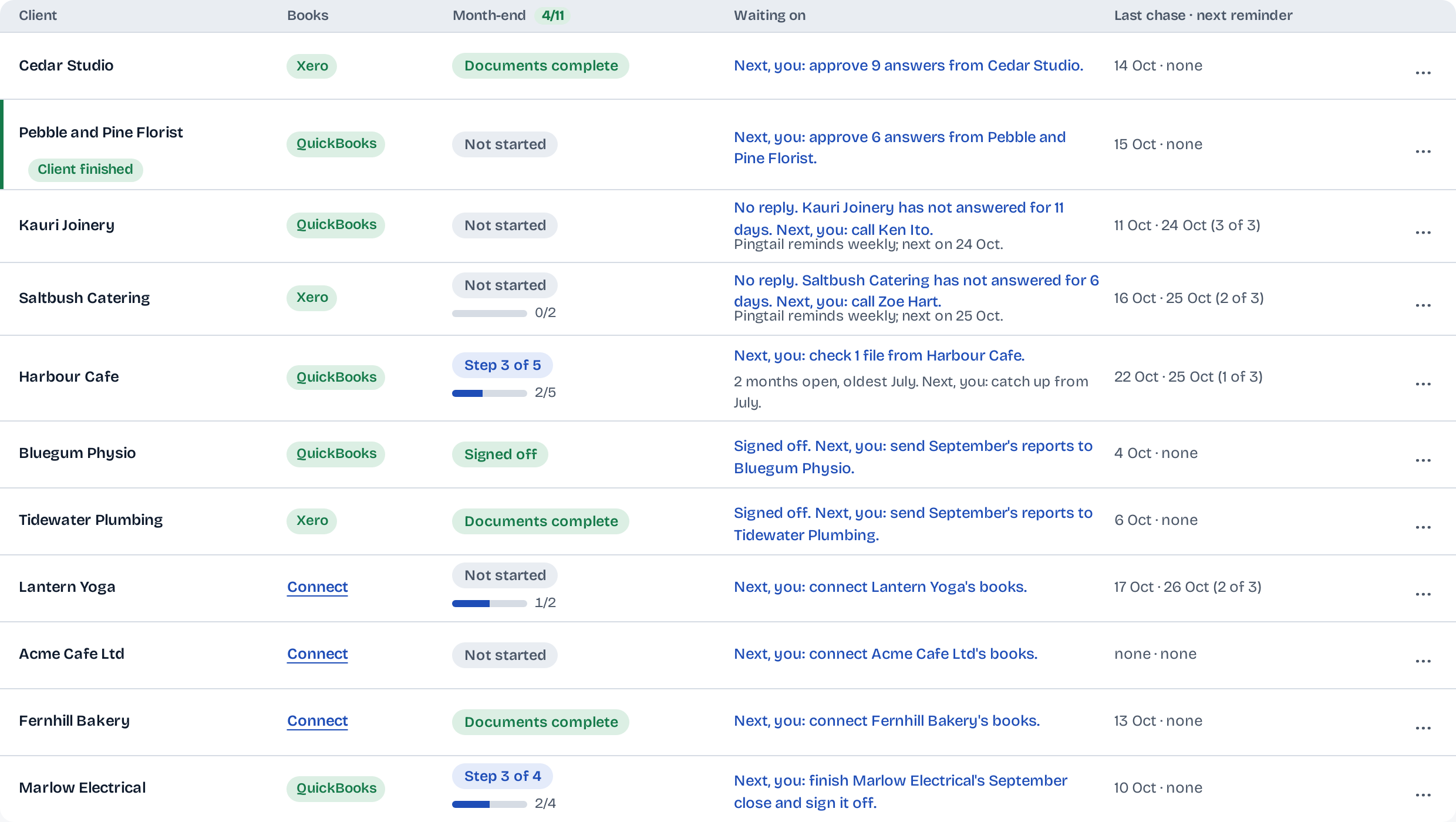
Each client's books, month-end and last chase on one row, and who acts next: you or the client.
Monday morning, forty clients, and the only way to know who is stuck is to open each one.
The board reads every client's month for you and names the next step on its row.
- Shows each client's month-end and last chase on one row
- Names the next step and who takes it
- Counts the month: how many clients are done
14 days free. One client. No credit card required.
How it works
From the whole practice to the one client.
The board is the first screen after you log in. Every row opens that client's workspace.
-
Step 1: Read the month at a glance.
How many clients are done, and the one step that moves the rest, as a single button.

-
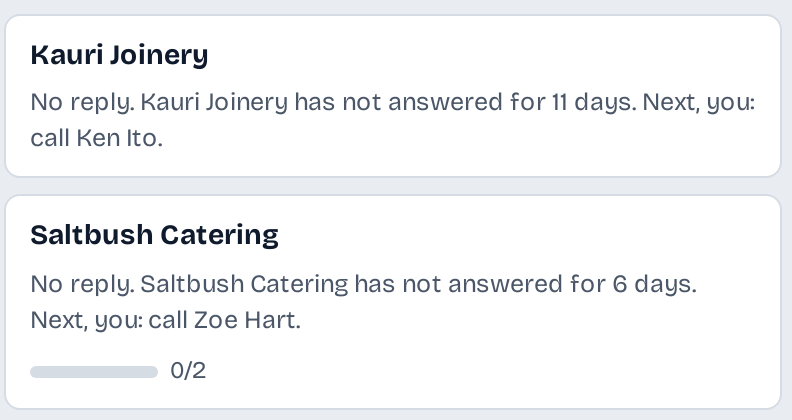
Step 2: See who has gone quiet.
A client who has not answered says so, with the number of days and the next step for you.
-
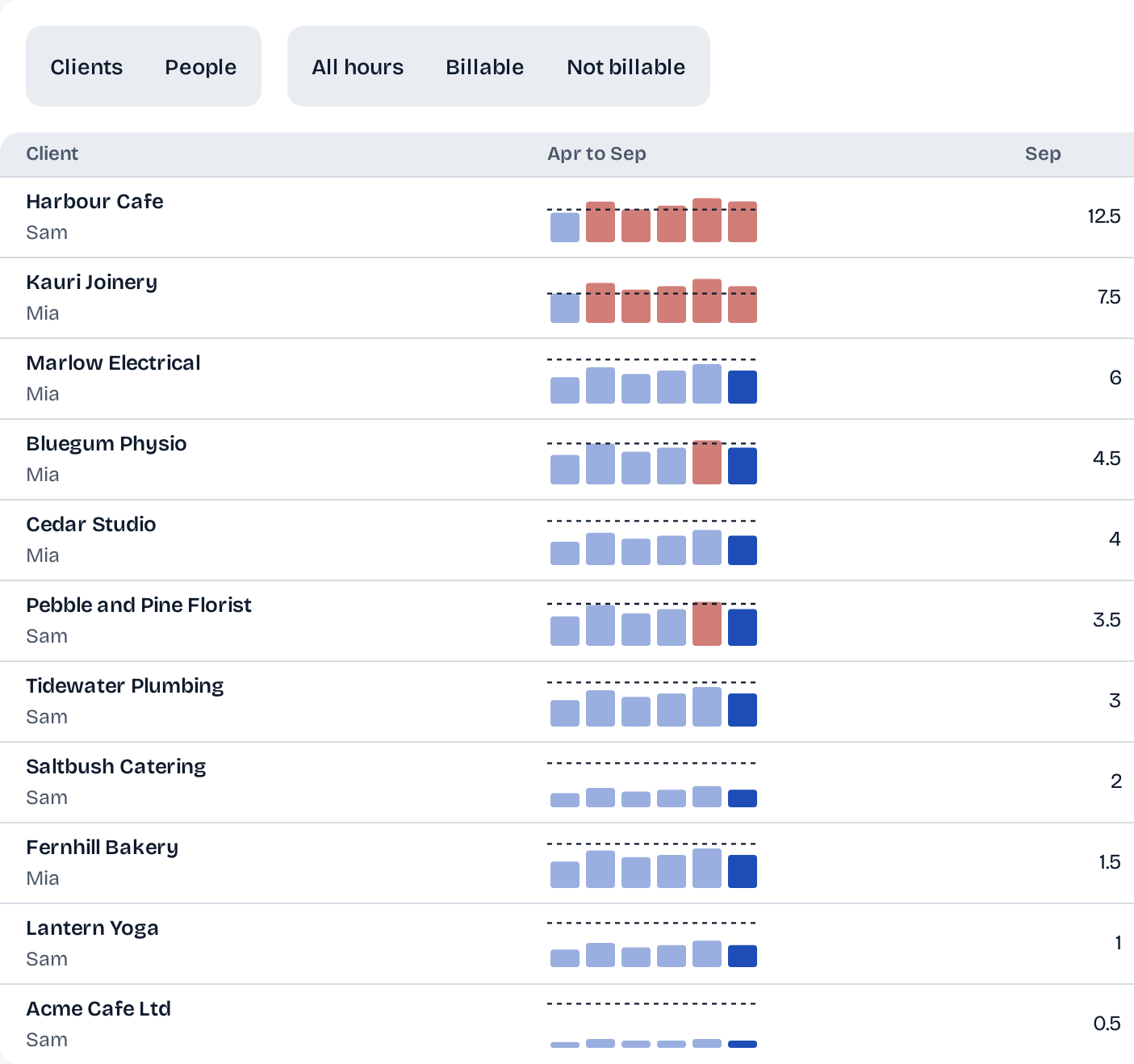
Step 3: See where the hours go.
Each client's hours, month by month, against its budget line, from the time your team types.
What stays in your control
A board that tells you, and changes nothing.
The board reads. Every step it names is yours or your client's to take.
A named next step.
Each row says what is next and who takes it, in plain words you can act on.
On the screen
Next, you: approve 9 answers from Cedar Studio.
Hours stay with you.
Time you type is for your own view of the practice. Nothing goes to a client's books.
On the screen
Time stays in Pingtail. Nothing goes to the books.
Staff see their own.
A team member sees their own time and their clients' totals; the owner sees everyone's.
On the screen
Staff see their own time and their clients' totals; the owner sees everyone's.
Who it is for
For the practice with more clients than memory.
Firm owners with a team.
Who prepares each client, and each client's hours against its budget, from the preparer column and Capacity.
Bookkeepers with monthly clients.
Every client's September on one screen, filtered to the ones not done.
Clients with or without connected books.
A client with no books connected still shows its documents and month-end, with Connect on its row.
Not what it does
- Bill your clients. Hours are for your own view.
- Take a step for you. The board names it; you or your client take it.
Before you start
Questions about the board.
Where does the next step come from?
From the client's month as Pingtail has it: lines to approve, files to check, a close to finish, or a client who has not answered.
Can I see only the clients not done?
Yes. Not done hides the rest, and List, Kanban and Tasks show the same clients three ways.
Can I choose the columns?
Yes. Columns shows or hides lines, documents, the client page, hours, the preparer and the reviewer, for each person.
Can I take the board out of Pingtail?
Yes. Export CSV downloads the rows you see.
What does it cost?
The board is included. Only active clients count towards the price.
Put your first client on the board this week.
Start with one real client, free for 14 days. No card.