 Pingtail
Suggested coding
Suggested, with the reason. Nothing posted until you press.
Pingtail suggests the account for each line it can place, with the reason, and shows the GST code the line keeps.
Forty lines sit in Ask My Accountant, and most are the same suppliers as last month.
Pingtail codes the habits for you to check, so your time goes to the lines that need a person.
- Suggests an account, and shows the GST code the line keeps
- Shows the reason: the client's history or the bank text
- Asks the client on the line when only they know
14 days free. One client. No credit card required.

How it works
From Ask My Accountant to the right account.
Pingtail reads the month's lines from the client's QuickBooks and works through them with you.
-
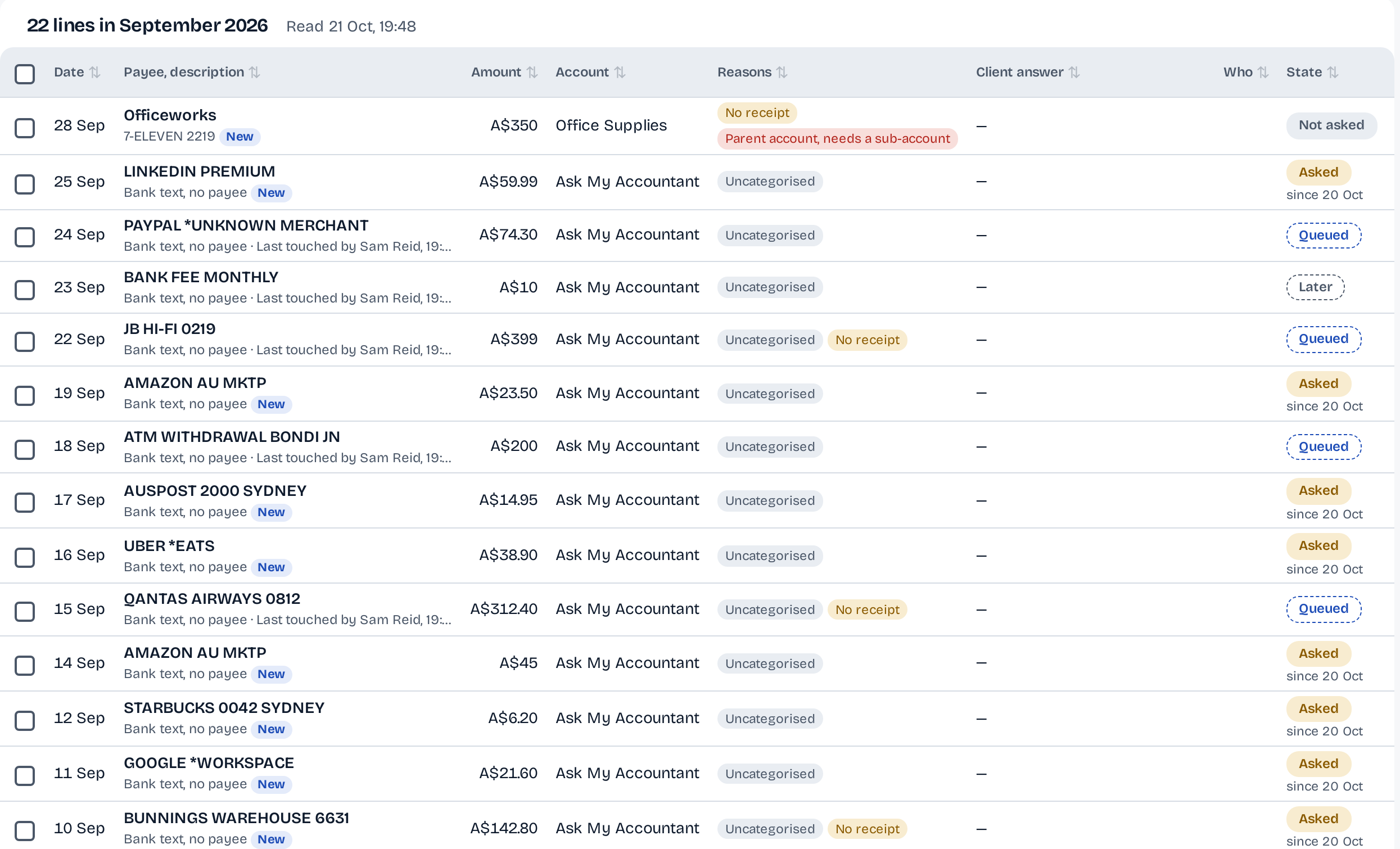
Step 1: See what needs a look.
Every line of the month with the reason it needs you: uncategorised, no receipt, a parent account. The suggestion sits on top, with its reason.
-
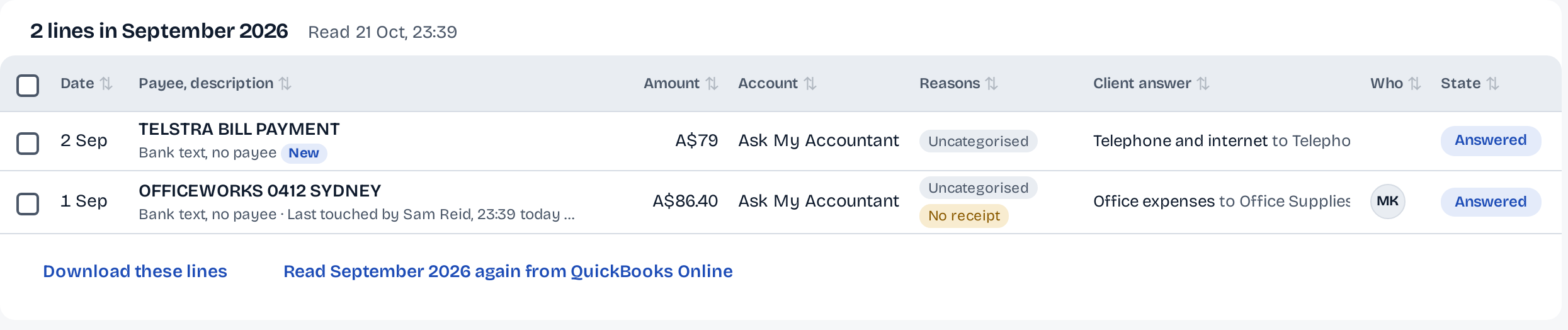
Step 2: Ask the client what only they know.
Send the line as a question. The answer lands on the line: "Telephone and internet", "Office expenses".
-
Step 3: Approve, then post.
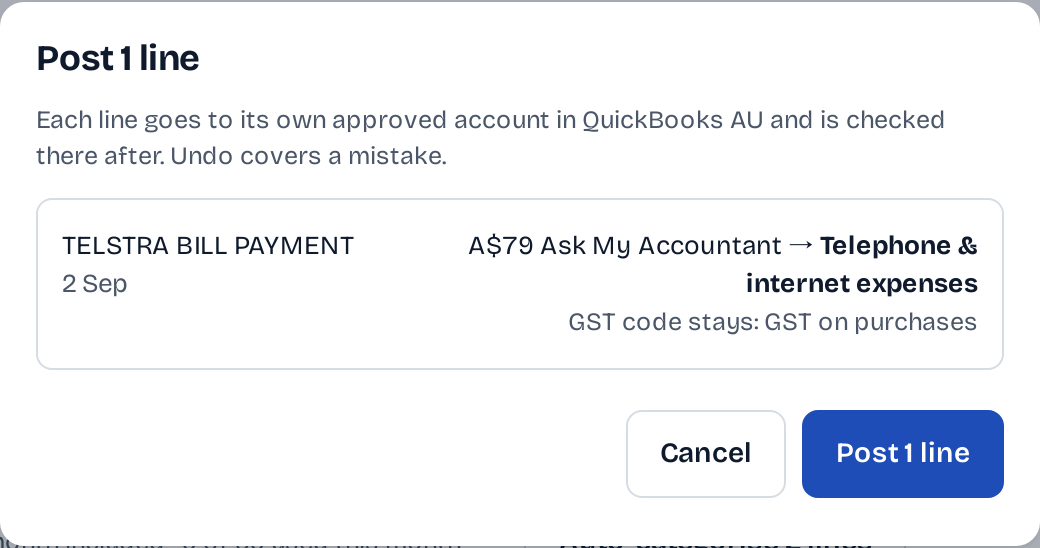
Approve one line or a whole group. Post shows the old account, the new account and the GST code first. Every change to a line has an Undo.
What stays in your control
A suggestion is never a posting.
Your firm decides every line. Pingtail shows its working and keeps the way back.
Your press, nothing before it.
No line reaches QuickBooks until someone at your firm presses Post. The button names the count.
On the screen
Post 1 line
Account and GST code, first.
The old account, the new one and the GST code the line keeps, before anything changes.
On the screen
Ask My Accountant to Telephone & internet expenses. GST code stays: GST on purchases
A way back.
Every change to a line (its account, its GST code, a split) keeps its before and after, with an Undo. A period closed in QuickBooks refuses the change.
On the screen
Undo covers a mistake.
Who it is for
For the firm that codes the same suppliers every month.
Bookkeepers clearing a holding account.
Lines in Ask My Accountant or Uncategorised, coded with a reason you can check.
Firms where the GST code matters.
The code is on the suggestion and the confirmation. A line moved off Ask My Accountant that keeps a code unlike its new account's usual one is marked Check GST, so you can fix it before you post.
Clients on QuickBooks Online.
Lines are read from the client's company and posted back to it on your press.
Not what it does
- Post on its own. A suggestion waits for your press.
- Run a bank feed. Pingtail works on the lines already in the books.
Before you start
Questions about coding.
How does Pingtail pick an account?
From this client's history, then the bank text. Each suggestion shows which one, so you can tell a habit from a guess.
What if the suggested account is wrong?
Change it before you approve, or press Undo on the line after it posts.
Does posting change the GST code?
No. The line keeps its GST code, and the confirmation shows it first. If it looks wrong, fix it on the line before you post.
What does it cost?
Suggested coding is included in the price of each client; fair use applies.
Can I approve a whole group at once?
Yes. Lines with the same suggestion are grouped, and one press approves the group. Post then lists every line before it changes.
Code one client's month this week.
Start with one real client, free for 14 days. No card.