 Pingtail
How it works
A month, from first pass to sign-off.
The AI does a first pass of the month. You check, post and sign off. Nothing reaches your books without your press.
-
Step 1: The AI does a first pass of the month.
Open a client’s Close page and start the first pass. Before it runs, it shows how many payments have no account. It shows how many your rules can fill, and how many the AI will read. It never posts to QuickBooks. It never sends anything to your client. Undo takes back what nobody has changed yet.

It asks before it starts.
-
Step 2: The AI suggests accounts, and says how sure it is.
Each payment going out with no account gets a suggestion when one fits. Your firm’s rules go first. Then the client’s posted history, then the bank text. The AI reads only the rest. A tax or wage payment, or a transfer, gets a note for you instead. Each suggestion shows High, Medium or Uncertain, with the reason. The AI never picks the GST code. You see it, and you can change it, before you post. In a client’s first month, no AI suggestion is marked High.
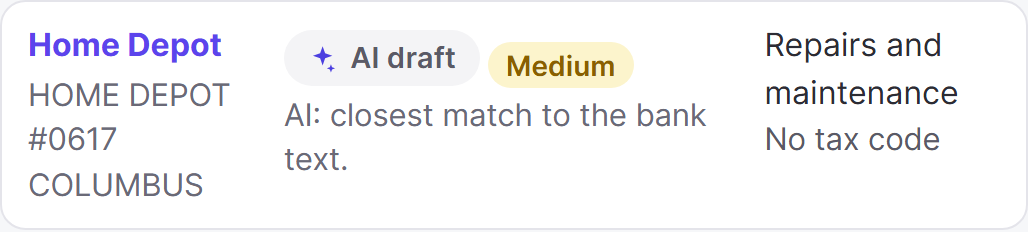
Each suggestion shows why.
-
Step 3: You send the AI’s question. Your client answers on their phone.
Sometimes the AI is not sure about a payment. Then Pingtail drafts the question for you to send to your client, such as “What is this for?”. A tax or wage payment, or a transfer, gets a note for you instead. Only you can decide those. You read the question and can change it. Then you send it. Your client answers on their phone, in your firm’s name. No app or password is needed.
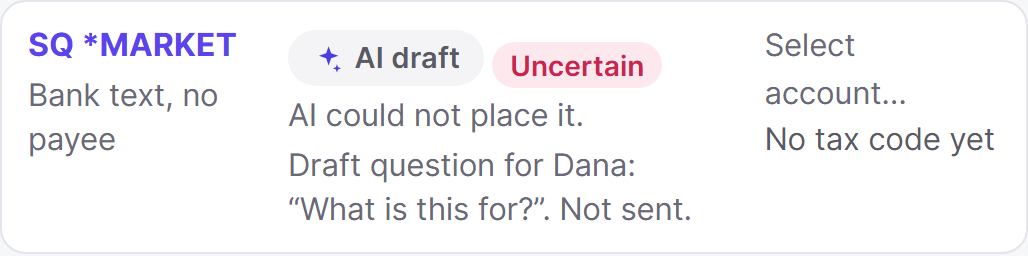
The question waits until you send it.
-
Step 4: The checks show what to look at before you sign off.
The first pass also runs the month’s 8 review checks. One check looks for payments with no supplier. Another looks for missing receipts. Each check shows what it found. You tick each check done yourself.
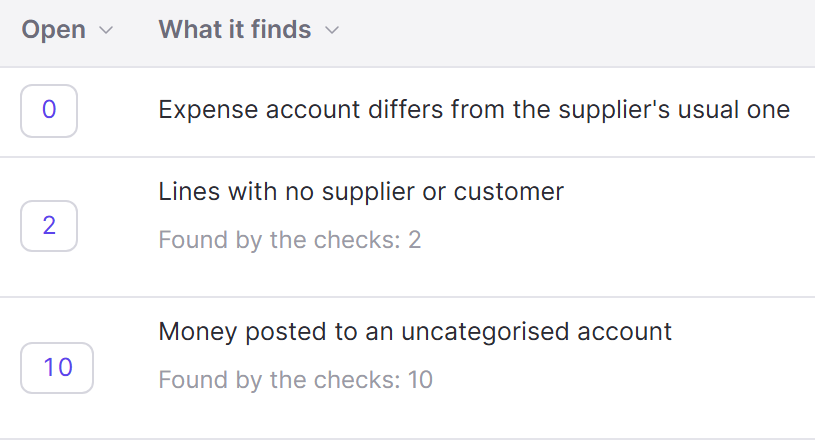
What each check found this month.
-
Step 5: Your team posts each payment. You sign off the month.
Your team checks each suggestion. They see the account and the GST code. Then they post it. Undo puts the old account back. When the month is done, you sign off on the Close page. The next month is then ready on the Clients list.

You sign off the month yourself.


S$12 for each client, every 30 days. The price includes 90 AI credits for your firm every 30 days. See pricing
Close your first month free with Pingtail.
One real client, every feature, free for 30 days. No card to sign up.