 Pingtail
This page is the full tour of Pingtail, in the order a request moves: you build it, your client receives it, each upload is checked, reminders chase what is missing, and you review and export. It is document request software for accounting and bookkeeping firms, and it does that one job only. The quickest tour is still your own: send a test request to your own email and upload a wrong file on purpose.
Build a request from a ready-made checklist
A request is for one client and one period. Say Moore Books wants August from Acme Cafe: you pick the monthly bookkeeping checklist, take out the loan statement because Acme Cafe has no loan, and send.
- Ready-made checklists for 15 countries, over a hundred in total: United States (10, from monthly bookkeeping and Form 1040 to state income tax and state sales tax), United Kingdom, Canada (with Québec), Australia, India (with state registrations), Ireland, New Zealand, Singapore, United Arab Emirates (with free zones), South Africa, Germany, France, Spain (with the foral territories and the Canary Islands), Netherlands and Mexico (with state payroll tax), plus a general set for everywhere else. Each one names the forms and slips of that country: W-2, T4 and RL-1, P60, Form 16, IRP5, Lohnsteuerbescheinigung, jaaropgave, CFDI de nómina.
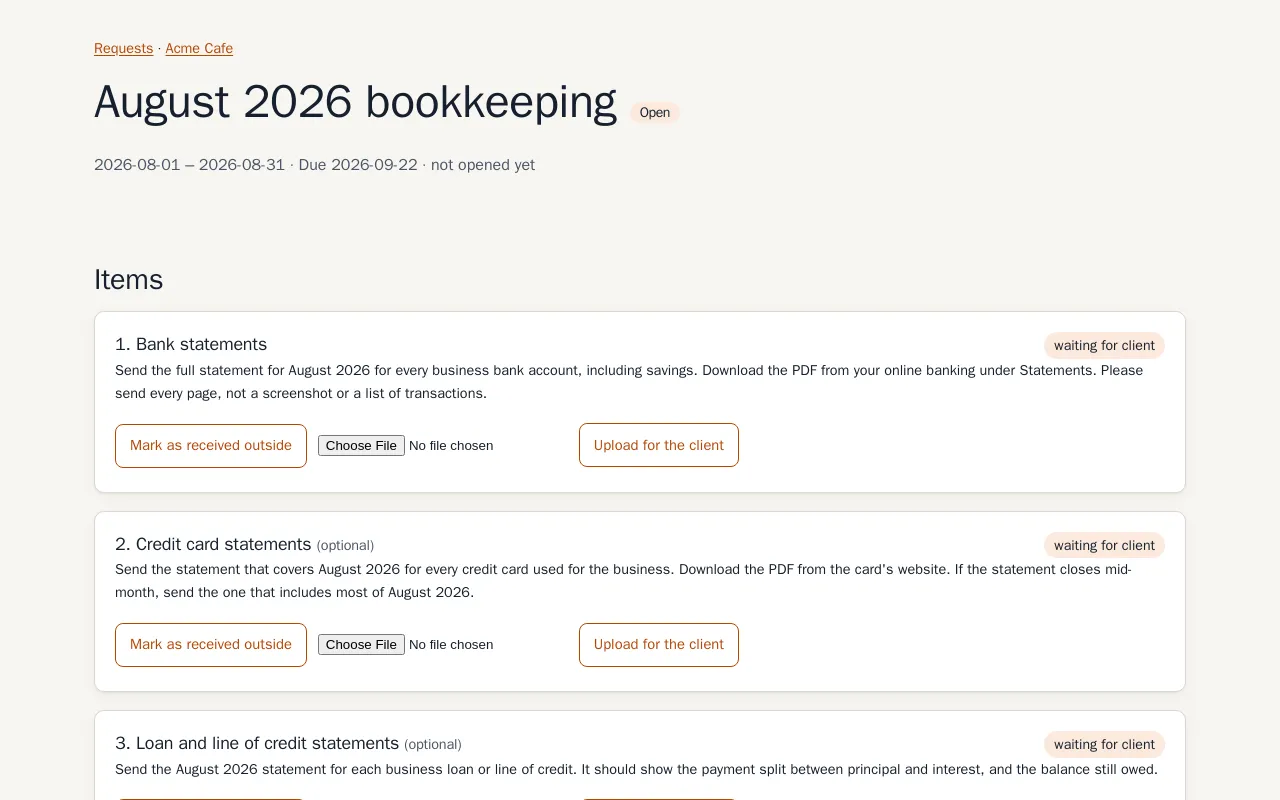
- Every item tells your client what to send, for which period, and where to find it. Items are required or optional: a file, a yes/no question or a short answer.
- Add or remove items on any request, then save it as your own template, which can be shared by link.
- The due date never defaults to the past. On paid plans a request can recur monthly, quarterly or yearly.
- A client can have several contacts. Import clients by pasting a list or CSV text.
What your client receives
One email, sent as "Moore Books via Pingtail". It greets the contact by first name, says why they received it, and has one button, in your firm's colour on paid plans. Replies land in your own inbox. The email also carries "Stop reminders" and "Report this request" links. If you prefer not to use email, copy the link and share it yourself.
What your client sees
The button opens one page for this one request. No account, no password, no app. It works on a phone, and "Take a photo" opens the camera. Your client can upload, answer, or say "not applicable this period" with a reason, which you approve. Everything is saved as they go, so the same link works again tomorrow, in English, Spanish or French. The full walk-through is on the client upload page.
How each upload is checked
Each file is checked at once, on the same page, normally in seconds. Fixed rules catch a password-locked PDF, missing pages, the wrong period, the wrong tax year, and a photo that is too small or too blurred. When the rules cannot decide, the check reads the document for its type and period.
The check can accept, ask your client to look again, or pass the file to you. It never rejects. Your client can always answer "This is correct, send it anyway", and the file reaches you with a flag. Detail on the upload checks page.
Reminders that stop on their own
Reminders are automatic and list only the missing required items, plus anything you sent back for a fix. The default schedule is day 3, 7 and 12 after sending; you can change it. They respect quiet hours in the contact's timezone and skip weekends unless you say otherwise. After the last one you get a "time for a call" email and they stop.
On any request you can pause reminders, send one now, or switch to "I will follow up myself". More on the reminders page.
For the client who never opens email, requests and reminders can go on WhatsApp from your own number instead, or as well, in the countries where that is available. It is set per contact, your client can switch it on or off themselves, and the same quiet hours apply. How it works, the numbers you can send from and what each one costs are on the WhatsApp page.
Review on one dashboard
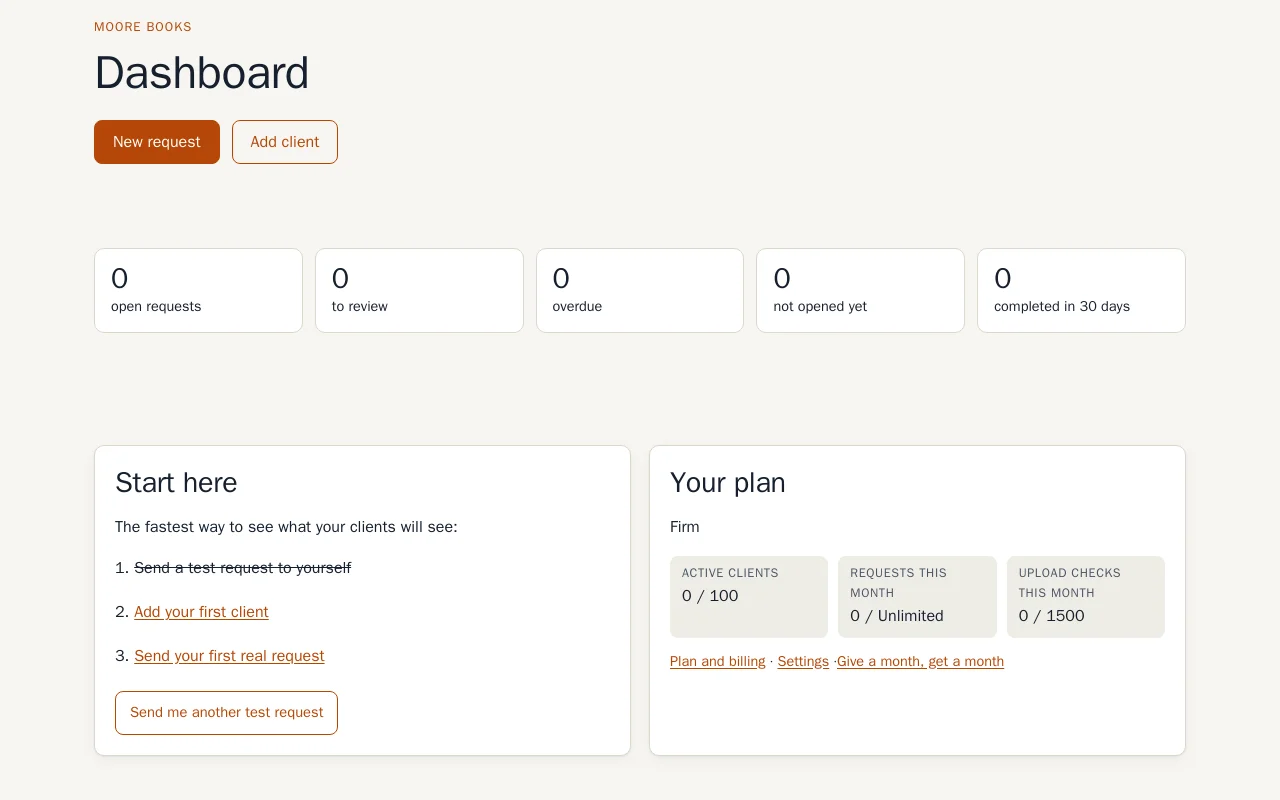
The dashboard counts open requests, to review, overdue, not opened yet, and completed in the last 30 days.
Next to each file you see what the check found: the problems it flagged, the periods it read in the file, and whether your client overrode the check and sent it anyway. You accept the file or send it back with a note, which your client gets by email at once. You can also approve or refuse "not applicable", mark an item as received outside the tool, or upload for the client.
Export a zip with clear file names
When a request is complete you download one zip. Files are renamed with your own pattern, by default {client}_{period}_{item}, and answers to questions come as a text file. Export works on every plan, including read-only.
Team and settings
Invite team members by email; seats depend on the plan (see pricing). Each client has an owner on the team, who gets the upload notifications, and on Monday morning a short summary email goes to your firm: open requests, overdue, waiting for your review, and what finished last week. If someone outside the team should hear about uploads too, such as a partner or an assistant, add them as a watcher: firm-wide or for one client, no seat needed. They confirm by email first, and every notification carries a one-click stop. Settings cover firm name, reply-to, timezone, country, client language, reminder schedule, quiet hours, weekends, file naming, retention (30 to 3,650 days) and, on paid plans, the button colour.
There are three roles, so a new assistant can start on Monday without being able to close the account.
- Owner. One person. Billing, cancelling, and handing ownership to someone else. Everything an admin can do.
- Admin. Settings, the team, shared templates and watchers, plus all the daily work. An admin can invite staff and remove staff, but not remove another admin.
- Staff. The daily work: clients, requests, uploads, review, export. Staff use the firm's templates rather than editing them, and a send that needs a card is handed to the owner.
Clients you keep, clients you pay for
A client is active, paused or archived, and you move them with one click. Pausing is for the client who is between accountants or who goes quiet for the summer: recurring requests stop, you cannot send them a new request, and their history and files stay exactly where they are. Archiving is the same, for good.
Only active clients count toward your plan's client limit, so a seasonal list does not push you onto a bigger plan. The client list has a search box and a filter by state, which is the difference between finding Harbour Cafe and scrolling past two hundred names.
What is due next in your country
Your dashboard shows the filings coming up for the country your firm works in, with the date, how many days away it is and who it applies to, taken from that country's own calendar. The request builder uses the same dates when it suggests a due date, so the documents are asked for before the filing, not after it. Change the country in settings and the calendar changes with it. It is a prompt, not advice: the authority's own site is linked beside it.
Security in brief
Every file is encrypted by the application before storage (AES-256-GCM, a key per file), so the storage provider holds only ciphertext. Client links are long random tokens stored hashed. Deleting a file removes it and its only key, and files go automatically after your retention period. We do not hold SOC 2 or ISO 27001. More on the security page.
What it does not do
If you need the things below in one tool, a practice management suite is the better choice.
- No time tracking, billing or workflow boards.
- No ledger and no tax software. It does not prepare or file anything.
- No e-signature, no payments and no client chat.
- No public API, and no Xero link yet. Accepted files can go to QuickBooks Online, Google Drive or Dropbox, or by email to tools like Dext and Hubdoc.
- Reminders go by email, plus WhatsApp from your own number where available. There is no SMS and no mobile app.